Everyday wishes that play
For the messages that matter on an ordinary day.
Some of the best messages are not tied to a date. A thank you, an apology and a well done all land better when they arrive as something to open. On Say Wishes you write a few words, pick a style and share one link, and the person you send it to taps, lights or opens something before they read what you wrote.
Nobody has to download an app or make an account. Every wish has a plain button as well, so it works for anyone on any phone.
Make a wish
These four work on any day of the year. Pick the one that matches what you want to say, then borrow from the ready-made wishes if the words will not come.
 Congratulations Tap the spotlight, set off the fireworks and read the good news. Any time of year
 Miss You Join two stars across the distance, then read the love. Any time of year
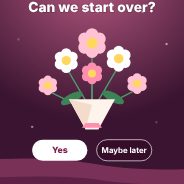 Sorry A small bouquet, one question and an honest apology. Any time of year
 Thank You Light three candles, then read the thanks. Any time of year
Which one should I pick?
- Thank You: For gratitude. Three candles on a shelf that they tap to light, one by one, until a warm glow fills the card and your thanks appears. Good for friends, family, teachers, hosts and colleagues.
- Sorry: For an apology. A bouquet and one question, “Can we start over?”, with a Yes they can tap and a Maybe later that keeps stepping aside. A quiet card with no confetti, made for saying sorry well.
- Congratulations: For good news. A night sky they tap to set off fireworks, with a finale before your message appears. Good for a new job, a pass, a win or any small victory.
- Miss You: For someone far away. Two stars over two small homes, and a glowing line they drag from one to the other until the stars join and your words appear. Good for a partner, a friend, a parent or a child.
Ready-made wishes
Not sure what to write? These pages have wishes you can copy or put straight into the tool.
Guides
- What to Write in a Congratulations Message: Ideas and Examples: How to write a short, warm congratulations message for a new job, an exam, a wedding, a baby or a goal, with a simple formula, examples and a checklist.
- Miss You Messages for Long Distance: What to Write: What to write to someone far away: a three-part formula, examples for a partner, friend, parent or child, a rhythm of contact, a short quiz and a checklist.
- How to Apologize in a Message: Examples and a Simple Formula: How to write a sincere apology by text, email or link: a three-part formula, examples for friends, partners, family and work, what to avoid and when to send it.
- How to Write a Thank-You Message: Examples and a Simple Formula: How to write a heartfelt thank-you message for a friend, family member, colleague, teacher or host, with a three-part formula, examples and a checklist.
How to send one
- Pick what you want to say: thank you, sorry, congratulations or miss you.
- Add their name, yours and your message. A preset will do, or open the thank you wishes for ideas and make one your own.
- Choose a style and press Replay to try it exactly as they will see it.
- Copy the link and send it by WhatsApp, text or email. It plays when it is opened, so there is no wrong day to send it.
Questions people ask
Which everyday wishes can I send?
You can send a thank you, a sorry, a congratulations and a miss you for someone far away. Get well soon and invitations are planned and will appear here when they are finished.
What should I write in a thank you message?
Name the thing they did, say how it helped, and keep it to a few lines. The guide how to write a thank you message has a three-step formula and examples.
How do I write a good apology?
Say sorry once, name what you did, and offer to make it right. The guide how to apologize in a message explains what to leave out.
What if they cannot play it?
Every wish has a plain button that does the same thing, so nobody gets stuck. It works on phones, tablets and computers.
Does it cost anything or need an account?
No to both. Every tool is free, and neither you nor the person you send it to needs to sign up or install anything.